Premium Coupons And Discounts Template

Over 1000+ working discount & coupon codes, enjoy!

Featured Coupons

Ad (728x90)

Latest Coupons

Senin, 14 Maret 2016

bubble sort Algoritma , Flowchart

bubble sort Algoritma , Flowchart

Kelompok 5 : bubble sort  , Presentasi Bubble sort Bisa lihat Di bawah ini Lengkap Dengan Flowchart , Codingan , Dan Algortima Dari bubble Sort .

Nama  : Irwan Syah
Nim : 2012420052

Nama : Handy Pranata
Nim :


Pengertian Bubble Sort

Bubble Sort adalah salah satu algoritma untuk sorting data, atau kata lainnya mengurutkan data dari yang terbesar ke yang terkecil atau sebaliknya (Ascending atau Descending).  Algoritma Bubble Sort adalah algoritma sorting paling sederhana. proses pengurutannya mirip seperti gelembung. Terdapat proses pertukaran atau istilah kerennya swapping.

Algoritma

1.       Tentukan Jumlah Bilangan yang akan di inputkan
2.       Inputkan bilangan 4,2,3,8,5
3.       Bandingkan bilangan 1 >/< bilangan 2
4.       Jika benar pindahkan bilangan 2 ke bilangan sisip
5.       Pindahkan bilangan 1 ke bilangan 2
6.       Pindahkan bilangan sisip ke bilangan 1
7.       Jika tidak lanjutkan proses
8.       Bandingkan bilangan 2 >/< bilangan 3
9.       Jika benar pindahkan bilangan 3 ke bilangan sisip
10.   Pindahkan bilangan 2 ke bilangan 3
11.   Pindahkan bilangan  sisip ke bilangan 2
12.   Jika tidak lanjutkan proses
13.   Ulangi langkah no 3 hingga hasil sesuai yang diinginkan


Flowchart


Presentasi  Online : fahrullghalib

Senin, 28 Oktober 2013

kumpulan aplikasi symbian terlengkap

 29 oktober 2013 hayun pardasuka

kumpulan aplikasi symbian

Suport muntukm Symbian S60v5 & Symbian S60v3

ayo gan jangan pake lama langsung aja sedott.....
cekidottt........ :-)

A

AnimationViewer.sis

Almoazen_7610_Duaa.sis
AdCallManager_v2.sis
AntiVirus_fsc_OS7.sis
Adobe.sis
anticommwarrior.sis
AlarmManager_v1.sis
AlonMP3Dictaphone_s60.sis
avira.anti.virus.zip
AlwaysOnMail.sis
AppManv1.04_full.sis
Aniviewer_2.0.sis
antivirusfscos7.sis
AudioAnalyzer.sis
AlternateControls_inTune.sis
AlonMP3player_s60.sis
AutoPilot.sis
AthanTime_v2.00.sis
Antropics_facewave_401.sis
AlarmPro.sis
Acping_S60_v113.sis
ACM_v1.04_UIQ.SIS
AgileMessenger_S60v1.sis
AnsweringMachine.sis
AgileMessengerN6600.SIS
agilemesenger.zip
Ad201.sis
AgileMessengerSeries60_V23.78.SIS
AgileMessenger_S60v2.sis
AlarmManager_201_3.sis
Allcom.sis
AgileMessengerSeries60_V23.84.SIS


Klik untuk download
B

Bluet.sis

Bemused.sis
BlueJackX.SIS
Blzinstapp.sis
BackgroundMusic_v1.50_S60.sis
Best.FileMan.v1.03.sis
BluetoothEnhancer_MultipleFileTransfer.SIS
BlueRadar_v1.SIS
Browser.sis
BluetoothEnhancer.SIS
bd.mobile.anti.virus.sis
bg_lighton_v1.0.sis
BlueTracker_N70.sis
BlackList60_v102.sis


Klik untuk download
C


CkyconPC.sis
CallCheater_v1.00_cracked.sis
CameraFX7650.SIS
CallRecorderS60.sis
CallCostSaver_v1.01.sis
ContactTrans_300v.sis
Compass.sis
city.time.2.51.sis
CallControl.sis
CallManager_v5.10_S60_OS7.sis
CameraFX.sis
Crystal.sis
camcorderpro3.sis
Caricaturet.sis
CelebrityMuppetsSnaps.sis
Camkaleid.sis
CameraFX_Key.SIS
Codec_N6600_MP3_OGG_MP4_plugin.sis
CubixMP3Player_v3.00.sis
CallRec_v2.19.sis
CallRec_v1.0.sis
CellTrack.sis
CallCheater.sis
Calcium1709.sis
CellBoard.sis
CallCounter_v1.00_cracked.sis
CoolMMSv1.03.sis

Klik untuk download

D


DVD_Player_v1_15.SIS
DivXPlayer_S60.sis
Desktop_wmaplus.sis
DictaPhone.sis
Diginaut_TimedSpy.sis
DigiaImagePlus_v1.2.sis
DigiaSound_Monitor_v1.01.sis
DigiaImageSpy.sis

Klik untuk download

E


english_indonesia_dictionary.jar
EasyLock_1.3.sis
EasyLock_v13.sis
easylock.v1.6.sis
eggclock.SIS
ETI_Camcorder_II_v2.1.sis
ETI.FlyCam.v1.01_S60SymbianOS7.sis
ETI_Camcorder.sis
EasyBackUp_v1.00.sis
eokzip_v1.12.sis

Klik untuk download

F


FExplorer.SIS
fexplorer1.12fulldotsis.sis
Flashlight_v1.1.0_S60SymbianOS8.1.sis
Flash_Lite_v2.1_OS8.sis
Flash_Lite_v2.1_OS7.sis
FlexiCam046.sis
Fileman_1.7.sis
FileMan_v1_03.sis
FSclock_S60.sis
Facewarp.sis
FIVN_Player_2.1.SIS
FotoFunPack_V104_EN.SIS
Fget.v0.70.sis
Facewave41_3st.sis
facestore_V4_46.sis
FScaller301_Full.sis
FullScreenCallPro_v1.0.SIS
fm_radio_Radio_program.sis
FIVN_Player_2.SIS
f_commwarrior.sis
f_skulls.sis
f_cabir.sis
FScaller60.sis
FunCam_v2.sis
FaceStoreSnap_441_s60.sis
f_locknut.sis

Klik untuk download

G


Guitar_Chords_v1.00.sis
GuitarTuner.sis
GravityAVECRadio_v1.0_S60.sis
GTi.sis
Griffon.SIS


H


HandyDates1.0.sis
HandyPhotoSafe.sis
HandySafe_S60_2_Full.sis
Heresy_Composer_S60_v1.10.sis
HandySafe_N70_N90_Full.sis
HandyClock.sis
Hijri_Converter.sis

Klik untuk download
 
I
IrRemote_v1.71.Cr.sis
imageplus.v1.2.t.sis
Instantsis.sis
Implus.v5.63.s60v2.Os7.sis
ImPlus_5.61_OS7.sis
ImagenaMobileRadio_v1.sis


J
Jokes_Bank.sis
JumboSMS.sis

Klik untuk download

K
Silahkan Pilih Versi : Download kumpulan aplikasi symbian s60v2 terlengkap


Selasa, 24 September 2013

RUMUS KEYBOARD


Google

25 september, 2013


RUMUS KEYBOARD

100 keyboard shortcuts

CTRL+C (Copy)
CTRL+X (Cut)
CTRL+V (Paste)
CTRL+Z (Undo)
DELETE (Delete)
SHIFT+DELETE (Delete the selected item permanently without placing the item in the Recycle Bin)
CTRL while dragging an item (Copy the selected item)
CTRL+SHIFT while dragging an item (Create a shortcut to the selected item)
F2 key (Rename the selected item)
CTRL+RIGHT ARROW (Move the insertion point to the beginning of the next word)
CTRL+LEFT ARROW (Move the insertion point to the beginning of the previous word)
CTRL+DOWN ARROW (Move the insertion point to the beginning of the next paragraph)
CTRL+UP ARROW (Move the insertion point to the beginning of the previous paragraph)
CTRL+SHIFT with any of the arrow keys (Highlight a block of text)
***SHIFT with any of the arrow keys (Select more than one item in a window or on the desktop, or select text in a document)
CTRL+A (Select all)
F3 key (Search for a file or a folder)

****ALT+ENTER (View the properties for the selected item)
ALT+F4 (Close the active item, or quit the active program)
ALT+ENTER (Display the properties of the selected object)
ALT+SPACEBAR (Open the shortcut menu for the active window)
CTRL+F4 (Close the active document in programs that enable you to have multiple documents open simultaneously)
****ALT+TAB (Switch between the open items)
ALT+ESC (Cycle through items in the order that they had been opened)
F6 key (Cycle through the screen elements in a window or on the desktop)
F4 key (Display the Address bar list in My Computer or Windows Explorer)
SHIFT+F10 (Display the shortcut menu for the selected item)
ALT+SPACEBAR (Display the System menu for the active window)
CTRL+ESC (Display the Start menu)
ALT+Underlined letter in a menu name (Display the corresponding menu)
Underlined letter in a command name on an open menu (Perform the corresponding command)
F10 key (Activate the menu bar in the active program)
RIGHT ARROW (Open the next menu to the right, or open a submenu)
LEFT ARROW (Open the next menu to the left, or close a submenu)
F5 key (Update the active window)
BACKSPACE (View the folder one level up in My Computer or Windows Explorer)
ESC (Cancel the current task)
SHIFT when you insert a CD-ROM into the CD-ROM drive (Prevent the CD-ROM from automatically playing)
Dialog Box Keyboard Shortcuts
CTRL+TAB (Move forward through the tabs)
CTRL+SHIFT+TAB (Move backward through the tabs)
TAB (Move forward through the options)
SHIFT+TAB (Move backward through the options)
ALT+Underlined letter (Perform the corresponding command or select the corresponding option)
ENTER (Perform the command for the active option or button)
SPACEBAR (Select or clear the check box if the active option is a check box)
Arrow keys (Select a button if the active option is a group of option buttons)
F1 key (Display Help)
F4 key (Display the items in the active list)
BACKSPACE (Open a folder one level up if a folder is selected in the Save As or Open dialog box)
m*cro$oft Natural Keyboard Shortcuts
Windows Logo (Display or hide the Start menu)
Windows Logo+BREAK (Display the System Properties dialog box)
********Windows Logo+D (Display the desktop)
*******Windows Logo+M (Minimize all of the windows)
*******Windows Logo+SHIFT+M (Restore the minimized windows)
********Windows Logo+E (Open My Computer)
*******Windows Logo+F (Search for a file or a folder)
CTRL+Windows Logo+F (Search for computers)
Windows Logo+F1 (Display Windows Help)
Windows Logo+ L (Lock the keyboard)
Windows Logo+R (Open the Run dialog box)
Windows Logo+U (Open Utility Manager)
Accessibility Keyboard Shortcuts
Right SHIFT for eight seconds (Switch FilterKeys either on or off)
Left ALT+left SHIFT+PRINT SCREEN (Switch High Contrast either on or off)
Left ALT+left SHIFT+NUM LOCK (Switch the MouseKeys either on or off)
SHIFT five times (Switch the StickyKeys either on or off)
NUM LOCK for five seconds (Switch the ToggleKeys either on or off)
Windows Logo +U (Open Utility Manager)
Windows Explorer Keyboard Shortcuts
END (Display the bottom of the active window)
HOME (Display the top of the active window)
NUM LOCK+Asterisk sign (*) (Display all of the subfolders that are under the selected folder)
NUM LOCK+Plus sign (+) (Display the contents of the selected folder)
NUM LOCK+Minus sign (-) (Collapse the selected folder)
LEFT ARROW (Collapse the current selection if it is expanded, or select the parent folder)
RIGHT ARROW (Display the current selection if it is collapsed, or select the first subfolder)
Shortcut Keys for Character Map
After you double-click a character on the grid of characters, you can move through the grid by using the keyboard shortcuts:
RIGHT ARROW (Move to the right or to the beginning of the next line)
LEFT ARROW (Move to the left or to the end of the previous line)
UP ARROW (Move up one row)
DOWN ARROW (Move down one row)
PAGE UP (Move up one screen at a time)
PAGE DOWN (Move down one screen at a time)
HOME (Move to the beginning of the line)
END (Move to the end of the line)
CTRL+HOME (Move to the first character)
CTRL+END (Move to the last character)
SPACEBAR (Switch between Enlarged and Normal mode when a character is selected)
m*cro$oft Management Console (MMC) Main Window Keyboard Shortcuts
CTRL+O (Open a saved console)
CTRL+N (Open a new console)
CTRL+S (Save the open console)
CTRL+M (Add or remove a console item)
CTRL+W (Open a new window)
F5 key (Update the content of all console windows)
ALT+SPACEBAR (Display the MMC window menu)
ALT+F4 (Close the console)
ALT+A (Display the Action menu)
ALT+V (Display the View menu)
ALT+F (Display the File menu)
ALT+O (Display the Favorites menu)
MMC Console Window Keyboard Shortcuts
CTRL+P (Print the current page or active pane)
ALT+Minus sign (-) (Display the window menu for the active console window)
SHIFT+F10 (Display the Action shortcut menu for the selected item)
F1 key (Open the Help topic, if any, for the selected item)
F5 key (Update the content of all console windows)
CTRL+F10 (Maximize the active console window)
CTRL+F5 (Restore the active console window)
ALT+ENTER (Display the Properties dialog box, if any, for the selected item)
F2 key (Rename the selected item)
CTRL+F4 (Close the active console window. When a console has only one console window, this shortcut closes the console)
Remote Desktop Connection Navigation
CTRL+ALT+END (Open the m*cro$oft Windows NT Security dialog box)
ALT+PAGE UP (Switch between programs from left to right)
ALT+PAGE DOWN (Switch between programs from right to left)
ALT+INSERT (Cycle through the programs in most recently used order)
ALT+HOME (Display the Start menu)
CTRL+ALT+BREAK (Switch the client computer between a window and a full screen)
ALT+DELETE (Display the Windows menu)
CTRL+ALT+Minus sign (-) (Place a snapshot of the active window in the client on the Terminal server clipboard and provide the same functionality as pressing PRINT SCREEN on a local computer.)
CTRL+ALT+Plus sign (+) (Place a snapshot of the entire client window area on the Terminal server clipboard and provide the same functionality as pressing ALT+PRINT SCREEN on a local computer.)
m*cro$oft Internet Explorer Navigation
CTRL+B (Open the Organize Favorites dialog box)
CTRL+E (Open the Search bar)
CTRL+F (Start the Find utility)
CTRL+H (Open the History bar)
CTRL+I (Open the Favorites bar)
CTRL+L (Open the Open dialog box)
CTRL+N (Start another instance of the browser with the same Web address)
CTRL+O (Open the Open dialog box, the same as CTRL+L)
CTRL+P (Open the Print dialog box)
CTRL+R (Update the current Web page)
CTRL+W (Close the current window)

Senin, 23 September 2013

hack semua handphon symbian

TUTORIAL CARA HACK SEMUA HP SYMBIAN

Terima kasih buat anonim yang di komentar meminta untuk membuat artikel cara hack symbian yang mudah dan pasti berhasil, yang disertai dengan gambar yang lengkap.

Ini adalah info penting, mengingat kebanyakan aplikasi yang saya share disini mengharuskan menggunakan hp symbian yang sudah di-hack.


Ketika banyak teman menghubungi saya baik itu di facebook, di sms atau juga di whatsapp intinya mereka menanyakan tentang bagaimana cara hack symbian, mereka banyak mengalami kesulitan.

Jadi di posting ini saya inshaallah akan membuat artikel mengenai hack symbian yang lengkap untuk semua tipe hp symbian.


Pada postingan terdahulu ada posting tentang cara hack e63 dengan mudah tanpa sertifikat kali ini saya jelaskan ulang walau intinya sama, hanya installserver.exe nya yang berbeda.

Kita mulai saja.
bila teman-teman belum ada aplikasinya saya sudah menyediakan aplikasi
untuk ngehack silahkan Sedot gan d bawah..........


Download dulu tool hack semua hp symbian yaitu.

+ X-plore 1.60 symbian s60v3 s60v5 s^3 anna belle signed.sisx

+ Rompatcher signed s60v3 s60v5 s^3 anna belle

+ Mobile security s60v3 s60v5 s^3 anna belle signed.sis

+ tmquarantine.zip

itu semua bisa buat semua tipe hp symbian anda, silahkan download semua.


Anda juga butuh installserver.sisx pilih install server yang sesuai dengan tipe hp anda:

Installserver untuk Symbian pre fp Symbian OS9.1 - Nokia 3250

- Nokia 5500 Sport

- Nokia E50

- Nokia E60

- Nokia E61

- Nokia E61i

- Nokia E62

- Nokia E65

- Nokia E70

- Nokia N71

- Nokia N73

- Nokia N75

- Nokia N77

- Nokia N80

- Nokia N91

- Nokia N91 8GB

- Nokia N92

- Nokia N93

- Nokia N93i

- Samsung SGH-i570


Installserver untuk

S60v3 FP1 (S60V3.1) - Symbian OS9.2 - LG KS10

- LG KT610

- LG KT615

- Nokia 5700 Xpress Music

- Nokia 6110 Navigator

- Nokia 6120 Classic - Nokia 6121 Classic

- Nokia 6124 Classic

- Nokia 6290

- Nokia E51

- Nokia E63

- Nokia E66 - Nokia E71

- Nokia E90 Communicator

- Nokia N76

- Nokia N81

- Nokia N81 8GB

- Nokia N82 - Nokia N95

- Nokia N95 8GB

- Samsung SGH-G810

- Samsung SGH-i400


Installserver untuk S60v3 FP2 (S60V3.2) - Symbian OS9.3 - Nokia 5500 - Nokia 5320 Xpress Music

- Nokia 5630 Xpress Music

- Nokia 5730 Xpress Music

- Nokia 6210 Navigator

- Nokia 6220 Classic

- Nokia 6650 Fold - Nokia 6710 Navigator

- Nokia 6720 Classic

- Nokia 6730 Classic

- Nokia 6760 Slid

- Nokia 6790 Surge

- Nokia E52 - Nokia E55

- Nokia E71x

- Nokia E72

- Nokia E75

- Nokia N78

- Nokia N79 - Nokia N85

- Nokia N86 8MP

- Nokia N96

- Samsung GT-18510 (INNOV8)

- Samsung GT-17110

- Samsung SGH-L870


Installserver untuk

S60v5 (S60^1) - Symbian OS9.4 - Nokia 5800 Xpress Music

- Nokia 5800 Navigator

- Nokia 5530 Xpres Music

- Nokia 5230

- Nokia 5233

- Nokia N97 - Nokia N97 Mini

- Nokia C5-03

- Nokia C6

- Nokia X6

- Samsung i8910 Omnia HD

- Sony Ericson Satio - Sony Ericson Vivaz

- Sony Ericson Vivaz Pro


Installserver untuk

Symbian^3 (S^3) Can Upgrade to Anna dan

Belle - Nokia N8

- Nokia E7

- Nokia C6-01

- Nokia C7

- Nokia X7

- Nokia 600 - Nokia 603

- Nokia 700

- Nokia 701

Silahkan download sesuai hp kamu


Setelah semua tool diatas anda download, sekarang kita mulai langkah-langkah hack symbian dengan mobile security.


+ Install dulu x-plore, rompatcher, dan mobile security. Jika ada perintah restart klik ya saja..


+ Ekstrak folder tmquarantine ke direktori c:\ dengan menggunakan x-plore


+ Buka mobile security, klik pilihan, pilih quarantine list
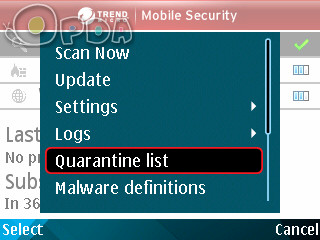


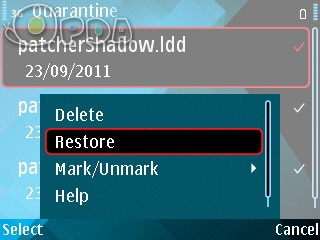
Maka disitu akan ada 4 file, klik pilihan - mark all terus klik pilihan - Restore


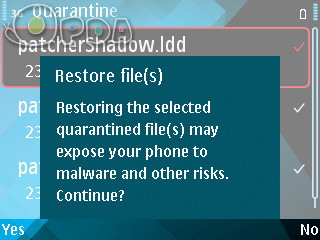
Ada keterangan restore klik saja yes


=>instal rompatcherPlus dan buka aplikasinya, terus Apply open4all
dan add to auto+


sekarang silahkan buka x-plore, cari file installserver yang anda download tadi, ekstrak file installserver.exe ke direktori C:\sys\bin\


Selesai sudah hack symbiannya, sekarang hp symbian anda sudah full hack bisa untuk install semua aplikasi.

Ok saya yakin anda pasti bisa karena tutorial hack symbian ini saya buat dengan urut dan mendetail, jika ada kesulitan silahkan hubungi saya, di rekomendasikan melalui facebook.


tag: cara hack e63 terbaru

Cara hack symbian paling mudah

Cara hack n73 dengan mobile security

Installserver untuk semua hp symbian

Cara hack symbian paling mudah 2013

Trik hack symbian dengan mobile security

Cara hack symbian langsung jadi

Blog tentang cara hack symbian E71

Bagaimana cara meng hack hp symbian layar sentuh

Cara hack symbian 5800

Cara hack hp nokia java symbian

Cara hack symbian belle anna


We are featured contributor on entrepreneurship for many trusted business sites:

  • Copyright © www.hayunigo12.com™ is a registered trademark.
    Designed by Templateism. Hosted on Blogger Platform.